You can sync your ChMeetings Calendar to your Google Calendar in a few simple steps:
- Go to your ChMeetings Calendar.
- Click the Share button in the top right corner of your screen..
-
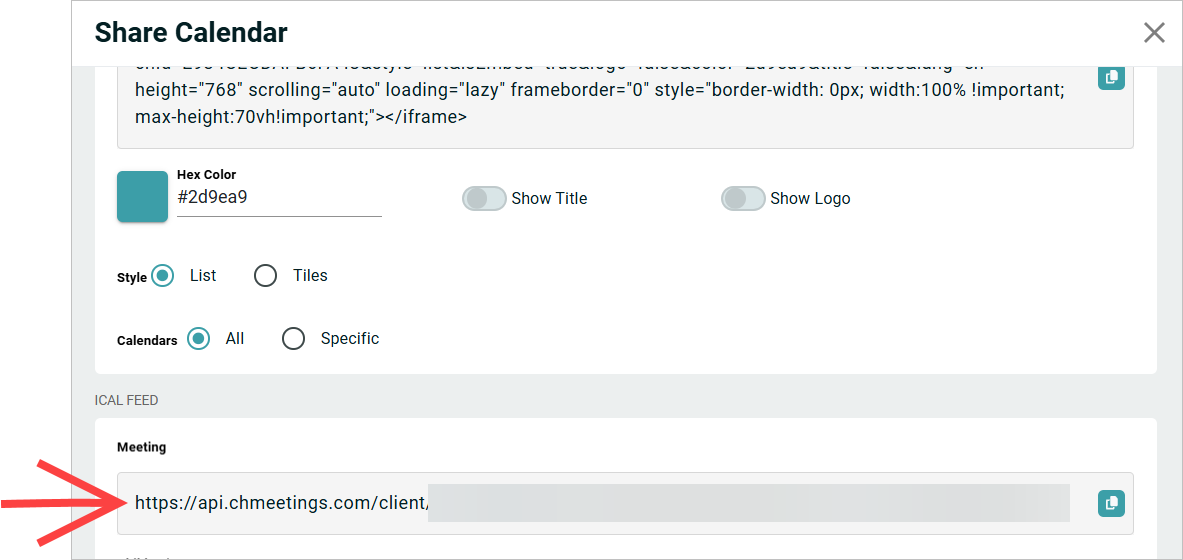
Scroll down to the iCal Feel and choose which calendar you would like to sync. All calendars, default or custom, will be displayed here. You can either choose one individual calendar, or choose the All option to sync them all. Each calendar comes with its own shareable link. Click the Copy button next to the calendar you want to use.
- Go to your Google Calendar.
- Click the ☩ button next to Other Calendars, then choose From URL.
- Paste your Calendar URL into the dedicated field, then click on Add calendar. Check the box below only if you want to make the calendar publicly accessible via Google. Leave this unchecked if you want the calendar to be kept private.
- Your calendar is now synced to Google. You can adjust further Google-specific settings if you need to.
Troubleshooting
If a ChMeetings event is still not appearing or updating correctly in Google Calendar through the iCal sync, please check the following:
- Make sure the event is Public. Only events set as Public will be included in the calendar sync. To view and change the event visibility, go to Events > Select your event > Edit your event > Under Visibility choose Public. Learn more.
- Allow time for Google Calendar to refresh: Google Calendar may take 24–48 hours to refresh changes from an iCal subscription. This refresh timing is handled by Google and cannot be controlled from ChMeetings.
- Re-sync the calendar if needed; If you need the changes to appear sooner, you can try removing the ChMeetings iCal calendar from Google Calendar and then adding/syncing it again.
-
Still not updated? Contact ChMeetings Support. If the event still does not appear correctly after re-syncing, please contact our Support team and provide:
- The event name
-
A screenshot showing how it appears, or does not appear, in Google Calendar
This information will help our team investigate the sync issue further.